The Overview
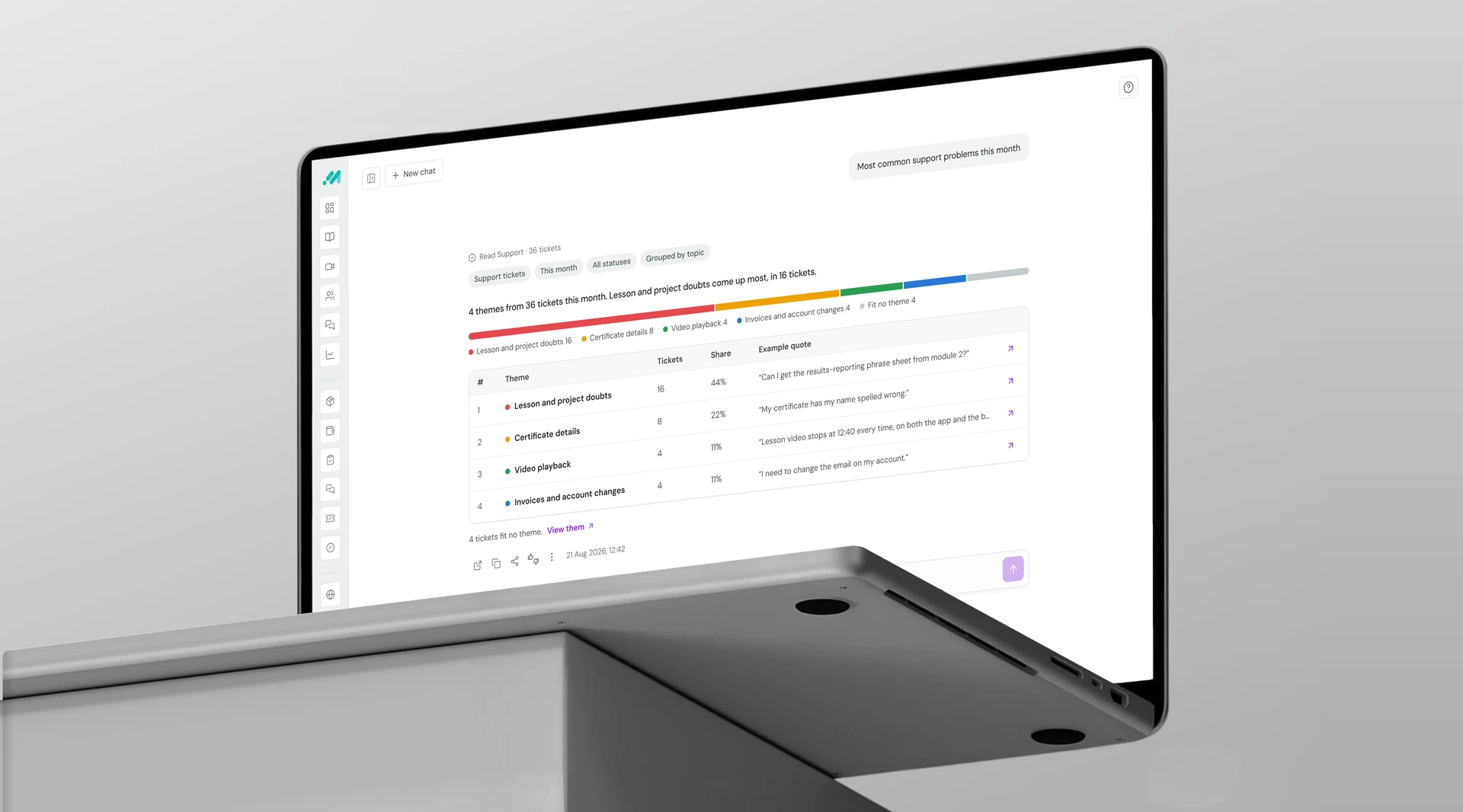
Scout is an AI data assistant inside the Medzen Academy admin panel. Admins ask in plain words, and Scout finds or summarises the answer from Medzen's own data.
The Problem
The panel had all the data. It couldn't combine it.
30 of 56 everyday admin tasks were slow or impossible. Finding learners who stopped learning took 375 steps across 186 profiles.
What I Did
As the sole product designer, I decided where AI should and shouldn't act, set the rules Scout follows, and designed the experience through to developer handoff with the product owner and engineering.
The Outcome
Pre-launch. Numbers come from the task audit, my design audit and targets agreed with the client.
The Brief vs. What Was Underneath
The request was AI. The real problem was the panel itself.
The brief said
Add an AI assistant to the admin panel so admins can ask for data.
What was underneath
Every answer existed, but it was split across modules, needed a calculation, or sat in ticket text. Admins exported to Excel or opened profiles one by one.
What changed
Scout became a reader that combines modules, not a chatbot. It answers only where the panel can't, and every answer leads back into the panel.
Where AI Belongs
I started from the admins' tasks, not from a chat screen.
Simple questions take thousands of steps.
Finding users with unbought cart items takes 2,401 steps across 1,200 profiles.
Not every hard task needs AI.
26 tasks already work with search or a filter, so they stay in the panel.
Risk, not demand, sets the order.
Find and Summarise only read data, so they ship first. Act waits for safeguards.
The panel didn't lack data.It couldn't combine it.
Tap the image to view large
How Scout Thinks
What Scout can do, and how it handles a question, defined before any screen.
Capability ladder
Dots show risk from my scoring. Monitor is low-risk but hard to build, so it comes last.
How it handles a question
Scout reads through controlled services, never directly from the database, and changes nothing in the first release.
Trust Rules
Three rules that decided every design call.
Never more than the admin can see.
(Admins have custom roles)Scout inherits the admin's access when they ask. Asking it to ignore the role changes nothing.
Applied in: partial answers and "can't answer" states
Never guess.
(Guardrail: zero made-up numbers)Scout uses agreed defaults and says so, and asks when it's unsure.
Applied in: clarifying questions and the condition chips on every answer
Every answer can be checked.
(Admins act on these lists)Scout's reading comes first, and every row or theme opens its records.
Applied in: Decision 3, the Summarise answer
Decision 1: Where Scout lives
Principle: Give the answer room
Problem
Scout's answers are tables, often hundreds of rows, plus clarifying questions and follow-ups. A small chat window can't show them.
What it had to hold (interaction spec)
- Tables : 10 rows per page, several columns.
- Conversation : clarifying questions and follow-ups.
- Reach : one click from every screen.
Final Choice
Option C, full screen
- Every Find answer is a table, and only full screen fits one well.
- Scored against all 7 capabilities: full screen 20 of 21, side panel 14, floating 10.
Trade-off
Scout doesn't know which page the admin came from, so they type the full question. Shortcuts and history on the start screen reduce the retyping.
Result
(Design check, not yet tested)Full screen fits 20 of 21 capability needs, so later releases won't need a new home.
Decision 2: One click to a live answer
Principle: Don't make admins repeat themselves
Problem
Each admin role checks the same data again and again. In Scout, getting one table right takes 2 or 3 messages, and they'd have to type them all again the next day.
Where it came from
The admin panel had the same problem: the same filters, sorts and categories set every day. We fixed it there with shortcuts. On any page with filters and sorting, an admin saves the table's setup as a shortcut and gets it back in one click. Scout uses the same shortcut, so admins learn it once.
What the shortcut had to do
- Saved by the admin : Scout never saves one on its own.
- Saves what's on screen : follow-ups made after saving don't change it.
- Stays live : today's data on every click.
Final Design
Saved by the admin, from any answer
- The admin saves an answer as a shortcut, with the table's filters, sorting and dates.
- Shortcuts sit on the start screen. One click reruns them on fresh data.
Trade-off
A saved shortcut can stop working when a course or field changes. Scout then says so instead of running it.
Result
(Design, not yet tested)2 or 3 messages become one click. 7 shortcut states designed, from saving to a shortcut that no longer works.
Decision 3: A summary admins can check
Principle: Every answer can be checked
Problem
Summarising 79 support tickets is where AI is most likely to be wrong unseen. A theme that sounds right but isn't sends the team after the wrong problem.
What the answer had to show
- Size : how big each theme is.
- Proof : real words from real tickets.
- Leftovers : what fit no theme.
Final Choice
Built on Option B
- One quote and a link per row, no expanding rows.
- "12 tickets fit no theme" sits under the table, so counts add up to 79.
- A label says Scout made the summary.
Trade-off
One quote per theme is less context than the cards. The arrow opens every ticket behind it.
Result
(Design check)31 + 22 + 8 + 6 + 12 = 79 tickets. Every theme and share adds up.
When Scout Could Get It Wrong
How the design handles mistakes, instead of hoping the model is right.
| Risk | What the design does |
|---|---|
| Misreads the question | Its reading shows as chips above the answer |
| Makes up a number | Every row opens its record; "Open in panel" uses the same filters |
| Admins trust it too much | "Scout can make mistakes. Check important numbers." on every answer |
| Numbers change while reading | The whole answer appears at once, never streamed |
| Data isn't tracked | Says why and offers one next step (21 failure states) |
The edge case
When the admin's role allows only half the answer
What happens
Without financial access, Scout still lists failed payments but hides the amounts. If the question needs money, like ranking customers by spend, it says it can't, and who can.
Fixing the Panel Underneath
An AI that repeats inconsistent numbers only makes them look official.
| What I found | What changed |
|---|---|
| Completion rate used two formulas | One definition: completed ÷ enrolled |
| Enrolments counted per order | Defined as paid and free enrolments, not orders |
| Progress measured in lessons | Hours watched ÷ course hours, agreed with engineering |
| "Learning activity" undefined | 3+ minutes of a lesson watched |
Validation
Scout isn't built yet. So far: a design audit, sign-offs, and the targets it has to pass.
| Measure | Target | Status |
|---|---|---|
| Accuracy | 19 of 20 Find test questions correct | Not yet run |
| Guardrails | 0 permission leaks, 0 made-up numbers | Not yet run |
| Efficiency | 3 steps or fewer, vs 375 today | Designed for |
| Control | 7 of 8 admins fix a wrong answer in one follow-up | Not yet run |
AI Usage
Where AI helped, and where the decisions stayed mine
| Stage | Tool | What I used it for | What I did with the output |
|---|---|---|---|
| Learning AI architecture | ChatGPT | How an AI reaches data: APIs, database, backend services | Chose controlled services, never direct database access |
| Pattern research | Claude + Mobbin | How 45 web apps place conversational AI | Chose full screen against my own requirements check |
| Task inventory | Claude | Structured my panel audit into a task sheet | Counted steps and decided which tasks need AI |
| Documentation | Claude + Figma | Laid out the process steps in Figma | Agreed each decision before it went in |
Reflection
- The hardest call was what Scout should not do. 26 tasks never needed AI.
- Most of the work was invisible: definitions, permissions and failure states.
- Next time, I'd test a rough Wizard-of-Oz prototype with admins before polishing.